The ops agent for your AI & SaaS tools

Your team's new toolbox, finally under control.

Tally is the ops agent that finds every paid tool, tracks seats and tokens live, and shows you what the spend actually produced.

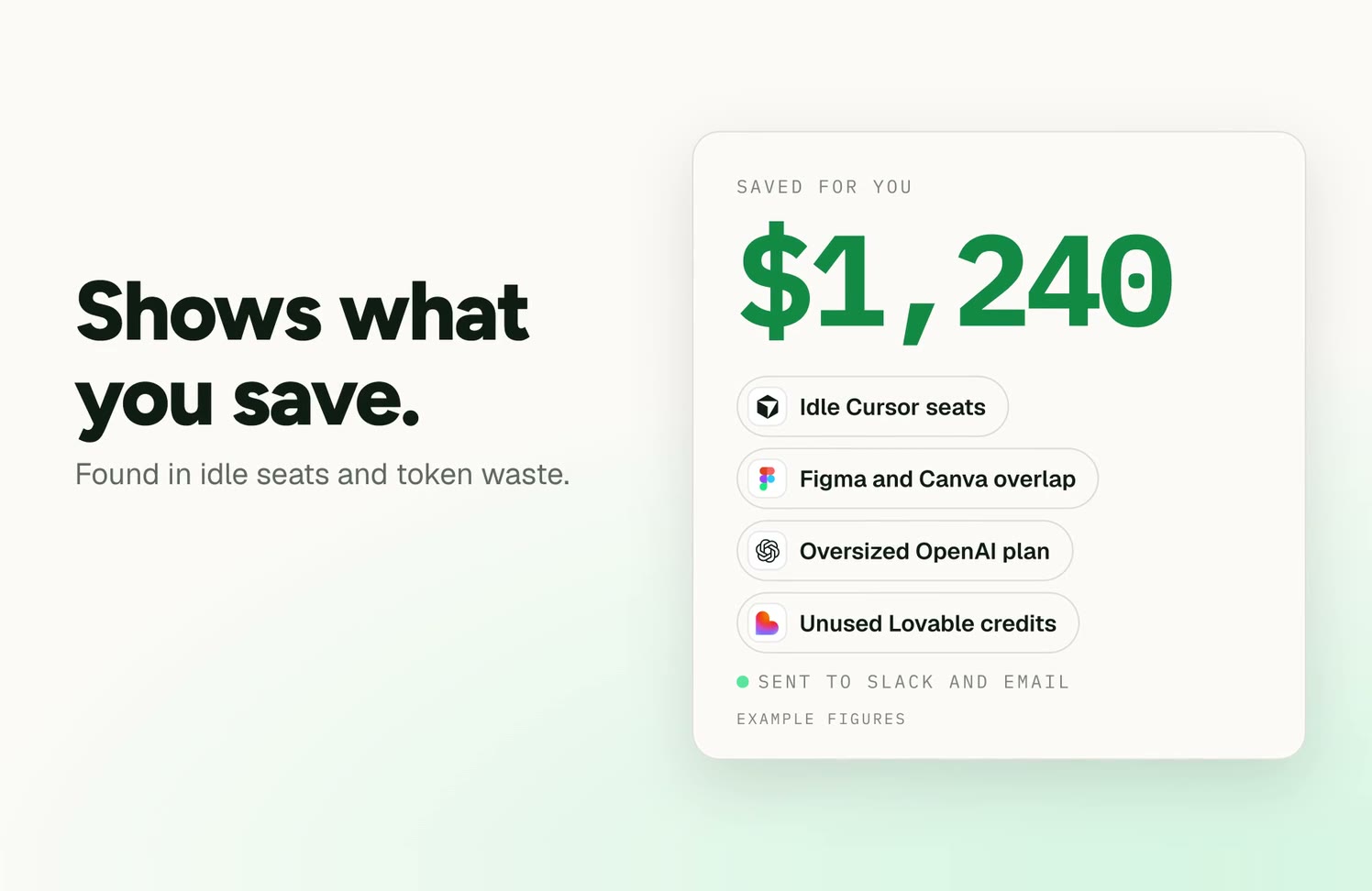
Tally's launch animation, with example figures: Tally finds every paid tool, tracks 11 unused seats and the token spend, and shows $1,240 a month saved across idle Cursor seats, the Figma and Canva overlap, an oversized OpenAI plan and unused Lovable credits.

Built for the tools your team actually uses

Live
  • OpenRouter
  • Claude Code
  • Codex
  • Slack
  • Email
Beta
    • BetaChatGPT
    • BetaClaude Code
    • BetaCodex
    • BetaCursor
    • Coming nextLovable
    • Coming nextVercel
    • Coming nextFramer
    • Coming nextWebflow
    • Coming nextFigma
    • Coming nextCanva
    • Coming nextMidjourney
    • Coming nextAdobe Firefly
    • Coming nextNotion
    • Coming nextmonday.com
    • Coming nextLinear
    • Coming nextSlack AI
    • Coming nextHubSpot
    • Coming nextChatGPT Team
    • Coming nextClaude admin data
    • Coming nextGemini
    • Coming nextSlack
    • Coming nextEmail
  • BetaChatGPT
  • BetaClaude Code
  • BetaCodex
  • BetaCursor
  • Coming nextLovable
  • Coming nextVercel
  • Coming nextFramer
  • Coming nextWebflow
  • Coming nextFigma
  • Coming nextCanva
  • Coming nextMidjourney
  • Coming nextAdobe Firefly
  • Coming nextNotion
  • Coming nextmonday.com
  • Coming nextLinear
  • Coming nextSlack AI
  • Coming nextHubSpot
  • Coming nextChatGPT Team
  • Coming nextClaude admin data
  • Coming nextGemini
  • Coming nextSlack
  • Coming nextEmail

01Bottom-up adoption

You told the team to move fast. They did.

78%

of IT leaders were hit by unexpected AI or usage charges.

Zylo 2026 SaaS Management Index

The best teams adopted AI tools without waiting for permission, and that was the right call. Now nobody can say what you pay in total, who owns each tool, or what it's producing.

  1. Who's paying for what?

    Subscriptions on personal and team cards.

  2. What's actually used?

    Licenses bought for whole teams, a fraction of seats active.

  3. What did we get for it?

    Sites, decks and campaigns go out; nobody links them to the bill.

  4. Is an automation looping?

    Credits run out mid-month from unattended scripts.

02The dual economy

You're paying twice, in two different currencies.

Seats are billed every month, used or not. Tokens and credits cost whatever you used, in units every vendor defines differently. Both land on the same card with no link to who used them or what they made.

Seats

Notion, Canva, Figma, ChatGPT Team, HubSpot, monday.com, Linear, Slack AI, Framer, Webflow, and Lovable and Vercel team plans.

The waste: idle seats, forgotten trials, and two or three tools doing the same job across teams.

Month-end invoice
Unvalidated total
Which team?
Unknown
Which artifact was produced?
Unknown
Who approved the top-up?
Unknown
Example

$4,860no owner, no output

Seats
$2,940
Tokens & credits
$1,920
Both layers land on the same card. Pick one to see it alone.

03How it works

It doesn't wait for you to look. It tells you.

Tally is not another dashboard. It is an ops agent: it checks your tools and bills continuously and comes to you, in Slack or email, with specific findings and a next step.
The Tally app with the demo team's sample data: the Overview, switched to 30 days, then Budgets.
Sample data: the demo team in the Tally app.

How the check works

Billed · Invoices

10

Claude Team, 10 seats, $300

Reported · Provider admin APIs

10

seats assigned

Used · The desktop app

6

people active this month

Validated view

4

idle seats to review before renewal

An illustration: invoices are planned, the figures are examples.

  1. 01

    Connect

    Sign in with your work Google account. Install the Tally Mac app (beta) on the computers you want to include.

    LiveBeta
  2. 02

    Tally finds your tools

    The Mac app scans each computer for AI tools. Next, Tally adds the tools on your card and in your Google or Microsoft account.

    BetaComing next
  3. 03

    It links spend to the work

    Which sites, apps, decks, designs and docs each tool and team produced.

    Coming next
  4. 04

    It brings you findings

    Budget alerts in Slack and email today; idle seats, duplicate tools and spend with no output behind it next.

    LiveComing next

    Pre-invoice limits on API traffic

    Set limits on usage-based tools before the bill. Hard caps apply to API traffic routed through the Tally gateway.

  • Tally for MacSynced 3 min ago
    Today
    $4.20
    This week
    $18.50
    This month
    $61.03
    • Claude Code and Codex tracked
    • Tool scan: 7 tools found on this Mac
    The desktop app lives in your menu bar. Example figures.
  • The Budgets view in the Tally app, with the demo team's sample data.
    Sample data: the demo team's budgets this month.

Integrations

Built for the tools your team actually uses.

Live
  • Model gateway

    OpenRouter & model APIs

    What Tally watches

    Token spend by team, tool and model; caps on gateway traffic

    • Live
  • Claude Code, Codex, Cursor

    Claude Code, Codex, Cursor

    What Tally watches

    Seats and token usage (Claude Code & Codex Live/Beta; Cursor scan Beta)

    • LiveCLI (Claude Code, Codex)
    • BetaTally for Mac (Claude Code, Codex), Mac app scan (Cursor)
  • Where findings go

    Slack, email

    What Tally watches

    Budget alerts today; agent findings next

    • LiveBudget alerts (Slack, Email)
    • Coming nextFindings (Slack, Email)
Beta
  • Chat & models

    ChatGPT, Claude, Gemini

    What Tally watches

    Team seats vs. active users; API token spend (desktop apps found by Mac app scan)

    • BetaMac app scan (ChatGPT)
    • Coming nextChatGPT Team, Claude admin data, OpenAI admin data, Gemini
Coming next
  • Build & ship

    Lovable + Vercel, Framer, Webflow

    What Tally watches

    Plans and credits, Vercel usage, sites and apps that went live

    • Coming next
  • Design & creative

    Figma, Canva, Midjourney, Adobe Firefly

    What Tally watches

    Editor seats vs. active editors, overlapping tools, generations used

    • Coming next
  • Docs & work

    Notion, monday.com, Linear, Slack AI

    What Tally watches

    Seats, AI add-ons and credits, docs and projects created

    • Coming next
  • Go-to-market

    HubSpot

    What Tally watches

    Seats by hub, AI credits, campaigns sent

    • Coming next

04Artifact attribution

Spend next to what it made.

Tally connects each tool's cost to the artifacts your team produced.
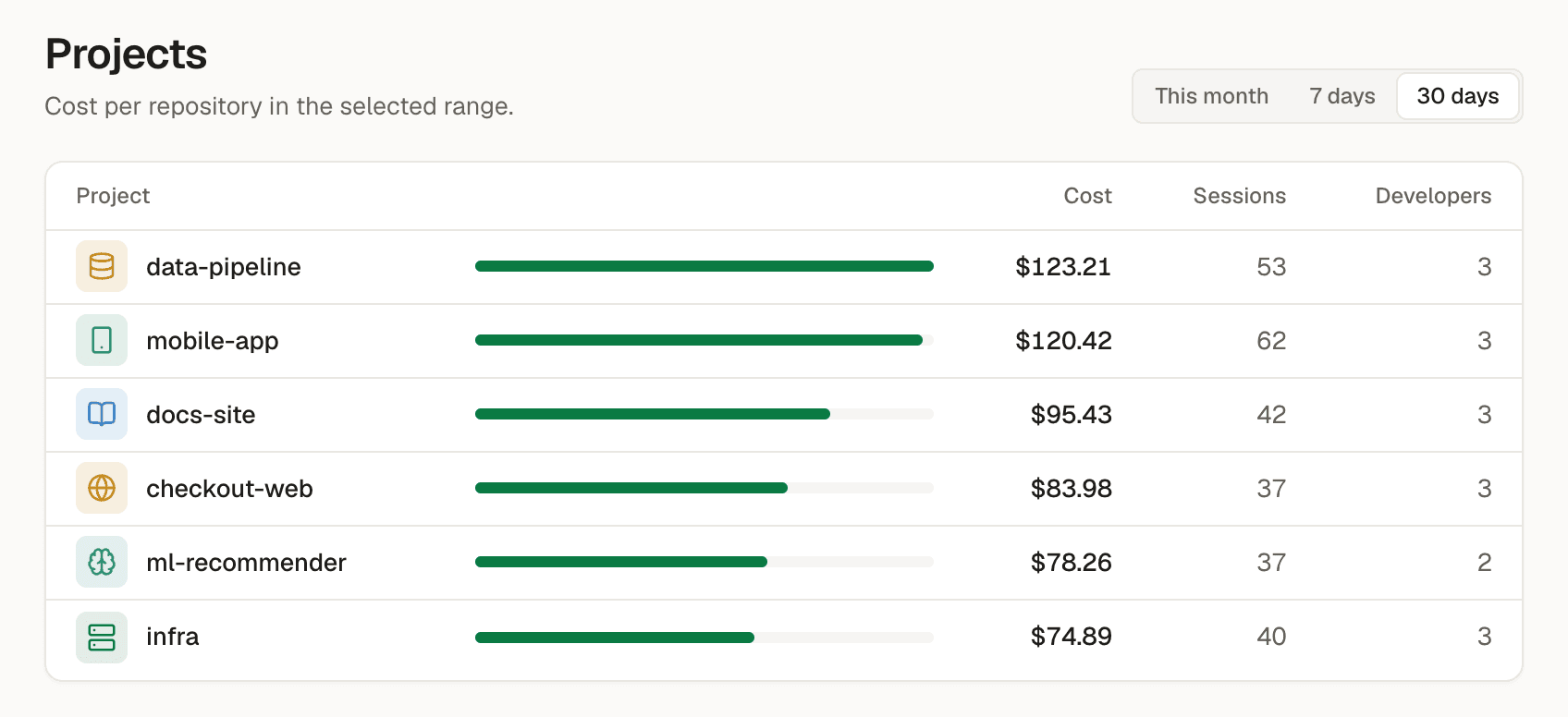
The Projects view in the Tally app, with the demo team's sample data.
Sample data: the demo team's Projects view. Artifact linking is rolling out in stages.
  1. Cut the waste

    Find idle seats and duplicate tools across teams before your next renewal.

  2. Keep what works

    Back the tools and teams that ship real customer value and delivered artifacts.

  3. Explain the bill

    Show founders and boards exactly what AI spend created in sites, apps, and revenue.

For founders and operators: adopt fast, stay in control.

  • Founders & COOs

    One answer to "what are we paying for, and what did it produce?"

    • Hard caps and budget alerts in Slack and email

    Next

    • Total visibility into the company AI toolbox
    • Proactive findings on idle seats and duplicate tools
    • Artifact attribution: delivered sites, apps and docs linked to spend
  • Team leads

    See your team's tools, seats and what they shipped

    • Per-project token and model usage breakdown
    • Usage quotas without slowing down creative work
    • Near-real-time team activity and session history

    Next

    • Deliverables and output connected to tool costs
  • Finance

    Every paid tool, explained before renewal

    • Monthly budget alerts before overages occur
    • Read-only finance role with company-wide visibility

    Next

    • Fixed seats and consumption tokens side by side in dollars
    • Card subscription matching and chargeback exports
  • The people doing the work

    Freedom to use the tools, with nothing to hide

    • Background sync with zero prompt or file capture
    • Own sessions and project totals
    • Personal statusline and menu-bar popover

    Next

    • Seats and credits next to your own output

05Privacy boundary

We measure tools and output, not people.

Reports are team-level by default. No screenshots, no keystrokes, no rankings.

Stays on the computer

  • Prompts and responses
  • Tool calls and their output
  • File contents and paths
  • Source code

Sent to Tally

  • Token counts per model
  • Timestamps and message count
  • Tool and session id
  • Project label and branch

The gateway never stores what passes through it.

  • Every team its own tenant

    Teams are isolated from each other. Every query is scoped to the caller's team. The isolation is covered by automated tests.

  • Secrets encrypted

    Provider keys and webhooks are encrypted. Each secret is bound to its own team. Admin keys are read-only.

  • Adoption, not surveillance

    Team-level insights and streaks. Nobody is ranked by tokens or spend. People see their own usage and team totals.

FAQ

Straight answers.

Is this another dashboard?
No. Tally is an ops agent. It checks your tools and bills continuously and comes to you, in Slack or email, with specific findings and a next step. Budget alerts work today; findings on idle seats, duplicate tools and spend without output are coming next.
Does Tally monitor my employees?
No. We measure tools, spend and output, not people. Prompts, responses, code and files stay on the computer. Reports are team-level by default; nobody is ranked.
Which tools does it work with?
Today: Claude Code and Codex (CLI, and the Tally Mac app in beta), OpenRouter and any tool routed through the Tally gateway, with alerts in Slack and email. The Mac app (beta) also finds AI tools installed on each computer. Coming next: Lovable and Vercel, Figma, Canva, Notion, ChatGPT Team, HubSpot, monday.com, Linear, Slack AI, Midjourney, Adobe Firefly, Framer and Webflow, plus Claude and OpenAI admin-panel spend.
Is there a Mac app?
Yes. Tally for Mac is in beta (v0.1.1, Apple Silicon and Intel). It lives in the menu bar, pairs your computer, finds your AI tools and syncs usage in the background. Install it from the download page (access is currently gated to invited teams; requires GitHub sign-in with repo access, or ask your team admin for the installer). Prefer the terminal? Developers can also connect Claude Code and Codex using the Tally CLI (tallyless).
How do I get access?
Tally is in internal beta. If your team has been invited, sign in with your work Google account. If not, request access at hello@ai6labs.com and we'll add you to the beta.
Why are seats and tokens counted separately?
Many tools are both: a plan per person plus a credit pool that runs out.
How does the seat check work?
Billed: AI subscription invoices from the admin's email, or uploaded by hand. Reported: read-only admin keys, OpenRouter today, Claude and OpenAI next. Used: what each person actually uses, measured on their own computer. The three are checked against each other.
What's the difference between equivalent API value and actual spend?
Equivalent API value: what subscription use would cost at list prices. Actual spend: money really paid. The two are never added together.
Where does our data live, and who can see it?
Each team is its own tenant, isolated from every other team, and provider keys are encrypted and bound to their team. The details are in the Privacy Policy.

Tally is in internal beta.

We're running Tally with a small group of teams first. Have an invite? Sign in with your work Google account. Want in? Request access and tell us which tools your team runs on. For founders and operators of teams of 20–150.

Sign in

Sign in with your invite

Already on Tally? Sign in with your work Google account. New team? Write to hello@ai6labs.com to request access.

Try the sandbox

The demo is a sandbox: a separate team with sample data. Invite people, change roles, set budgets and routing rules, then reset it from Settings. It never shows real usage or sends anything.